evil crawling things How to Redeem Codes
Open Shop → Codes, paste FOG or RELEASE, and turn free Coins into survival gear.
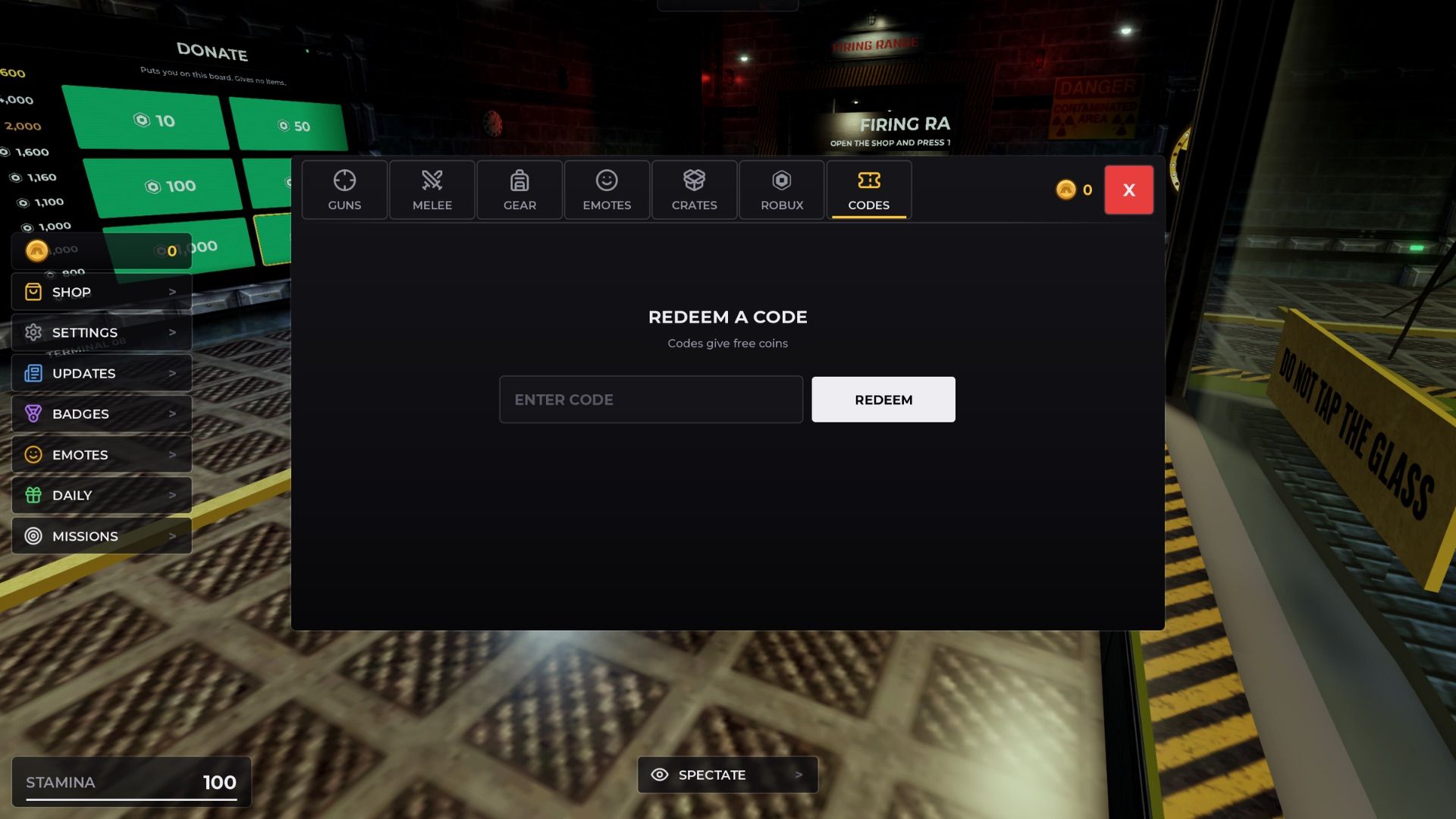
Free Coins from promo codes are the fastest early boost in evil crawling things, the Roblox horror survival experience by :WaitForCat(). This guide walks through the exact Shop → Codes redeem path, explains what to do when a code fails, and shows how to spend FOG and other rewards before crawlers punish a weak loadout. Pair it with the live list on Codes, first-hour habits in Getting Started, and spend priority on the Tier List.
Why redeeming before you shop matters
Short rounds mean every Coin counts. Redeeming before your first serious shop visit lets you skip starter poverty and buy fog-ready tools such as shotguns or explosives. Group members already earn about 1.2x Coins; stacking that with a 5,000 Coin code like FOG is the strongest beginner jump available in November 2026.
Step-by-step: redeem in the Shop
- Join evil crawling things on Roblox and wait for the map to finish loading (often the Forest layout with fog).
- Look at the left side of the HUD and click Shop.
- Inside Shop, open the Codes tab or Codes button.
- Click the enter-code field and type or paste the code exactly (example:
FOG). - Press Redeem / Claim and watch your Coin balance update.
- Leave Codes, browse weapons, and buy with the new balance.
Codes are tied to your Roblox account, not to a single server slot. You do not redeem in chat, and you never need an external website or executor to claim official promos.
Active codes to try first (November 2026)
| Priority | Code | Typical reward | Notes |
|---|---|---|---|
| 1 | FOG | 5,000 Coins | Active (NEW) with Forest fog update — redeem first |
| 2 | RELEASE | 250 Coins | Launch-era; still worth one try |
| 3 | UPDATE | 5,000 Coins | Often expired after fog patch — verify once |
Full status tables and patch context live on Codes and Updates. Community lists disagree on UPDATE; treat FOG as the reliable headline redeem.
Screenshot-level UI tips
- If Shop does not open, finish any round countdown or death screen, then click again.
- If the Codes field rejects input, clear spaces and match capitalization.
- After a successful redeem, stay in Shop and purchase immediately so you do not forget the balance mid-lobby.
- On mobile, the left Shop control can sit under other buttons — rotate the camera slightly if the tap target feels blocked.
What to buy right after FOG
A 5,000 Coin dump should fund fog meta tools, not vanity:
- Shotgun or explosives for close crawler deletes in Forest fog.
- SMG or a flexible gun for rotations once you have a panic button.
- Cheap melee only if surplus remains.
- Emotes last.
Details and rankings: Best Loadouts, Weapons and Gear, Tier List. Survival timing still matters more than the receipt — read How to Survive and How to Hide.
Troubleshooting failed redeems
- Already redeemed — most codes are one-time per account.
- Expired — common for UPDATE after the Forest fog drop; FOG should still work while marked active on Codes.
- Typo / extra space — paste carefully; do not add quotes.
- Wrong menu — must be Shop → Codes, not group shout or Discord paste into chat.
- Lag — finish the current UI animation, re-open Shop, re-check balance.
- Scam pages — never download “auto redeemers.” Real codes only need the in-game Codes tab. Risk notes: Scripts.
Where new codes appear
There is no official Trello. Watch the community Discord (invite), in-game banners after experience updates, this wiki’s Codes hub, and the Updates timeline. Theme codes often ship with map patches — FOG arrived with Forest fog for a reason.
Controls reminder while you redeem
Redeeming is UI-only, but after you buy gear you still need movement and combat habits. See Controls for PC, mobile, and controller basics, then return to Forest routes in Forest Map.
Related pages
- Codes Hub — live FOG / UPDATE / RELEASE status
- Getting Started — first-round checklist
- Best Loadouts — spend the Coins well
- Updates Hub — why FOG exists
- Guides Hub — full tutorial index
Redeem early every session, especially after patches. Coins in the bank do nothing until Shop → Codes turns a string into a shotgun.
Frequently Asked Questions
Quick answers for evil crawling things survivors.
Where is the codes menu in evil crawling things?
Open Shop on the left side of the screen, then select the Codes tab. Enter the code and press Redeem.
What is the best code to redeem first?
As of November 2026, redeem FOG for 5,000 Coins first. Then try RELEASE; check UPDATE once because many players report it expired after the fog update.
Do I redeem codes in Roblox chat?
No. Use the in-game Shop → Codes UI only. Chat commands and third-party redeem sites are not the official path.
Why does my code say invalid?
It may be expired, already claimed on your account, mistyped, or entered in the wrong menu. Fix spelling once, then move on if it still fails.
Can I redeem the same code on multiple accounts?
Each Roblox account must redeem separately. Codes are per account, not shared across a whole household automatically.